An address for this account
An alias is a working email address. Use it in a website’s normal email field. Its messages arrive in Vaultless and can also be forwarded to your usual inbox.
How it works
Most accounts ask for an email and a password. Vaultless gives you a separate pair for each one, then keeps its mail and security updates alongside them.
An alias is a working email address. Use it in a website’s normal email field. Its messages arrive in Vaultless and can also be forwarded to your usual inbox.
Create and save a different password for the account. Open it in Access or use AutoFill after enabling Vaultless on your device.
Open the account’s Mail for a code, receipt, or security message. The main Mail tab brings messages from all your aliases together.
One account, from start to finish
These examples separate what you do in Vaultless from the changes you make on the website.
Choose the website. On first use, create your two-part Master Key and keep it safe. Confirm to create an alias and save the matching password.
The website gets a separate email and password. Your personal email stays out of this signup.
 Vaultless · Orchard MarketExample data only
If you already use a password manager
If you already use unique passwords, keep doing that. Vaultless adds a place to manage an account’s email address, mail, and breach history alongside its password.
Some password managers offer email aliases, too. Try Vaultless with one account to see whether keeping its messages and login together works better for you.
Keep your existing sign-ins available while you try it. Vaultless Shift imports website and account details and leaves passwords out of the import. You create new sign-in details and update each website yourself.
See how it fits your devicesAccount mail
Read one account’s messages or search across your aliases. Keep drafts, reply to mail, and follow delivery updates found in your messages.
To encrypt a message with a shared key, use the lock control and send the key to your recipient through a different channel. Ordinary email is not end-to-end encrypted.
Understand mail privacy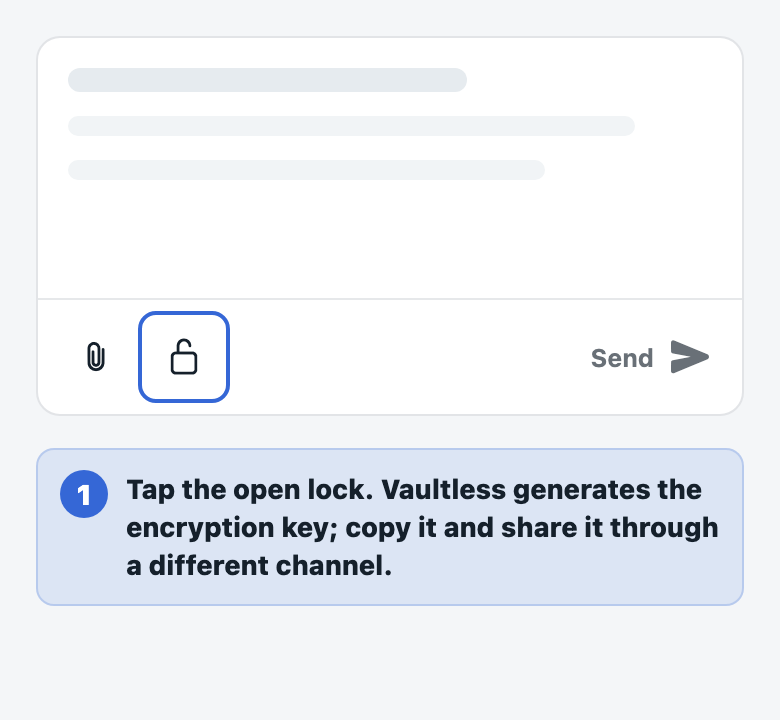
Use passkeys and generate two-factor codes for your accounts.
Keep sensitive notes and local files protected on your device.
Import your accounts, update each website, and mark the changes done in Vaultless Shift.
Plan for a new phone with recovery, encrypted backups, or device transfer.
The iPhone beta
Join through Apple’s TestFlight. Start with a new signup, get comfortable, and bring over other accounts when you’re ready.